
Download Softdiv PDF to Image Converter – PDF to Image, Convert PDF to Image, PDF to JPG, PDF to PNG, Image Converter
Overview
Softdiv PDF to Image Converter is a dedicated utility designed to streamline the process of transforming PDF documents into various image formats. The application enables users to convert PDFs into PNG, JPG, BMP, GIF, TGA, and TIFF files, offering flexibility for diverse use cases. This tool is particularly useful for individuals and professionals who need to extract visual content from PDFs for web publishing, presentations, digital archiving, or print preparation. By converting documents into image files, users gain the ability to embed content into design software, share visual snippets without requiring PDF readers, or integrate materials into platforms that do not support PDFs.
The app is developed by Softdiv, a company known for creating lightweight, no-frills tools focused on file conversion and document management. Although the developer did not provide additional technical details about their background, the application’s consistent functionality and stable performance suggest a reliable development approach. Target users include students, content creators, graphic designers, educators, and office workers who frequently handle PDF documents and require quick image exports. The tool is especially valuable in scenarios where preserving layout integrity is essential, such as converting scanned reports, academic papers, or technical diagrams into image form.
Within the broader productivity app ecosystem, Softdiv PDF to Image Converter fills a niche by offering a focused, efficient solution for a common task. Its free availability and minimal system footprint make it accessible to a wide audience, particularly those seeking a no-cost alternative to more complex desktop software. The application’s purpose is clear: to simplify PDF-to-image conversion without unnecessary features or distractions.
Key Features & Functionality
- Multiple Image Output Formats: The tool supports conversion to PNG, JPG, BMP, GIF, TGA, and TIFF, enabling users to select the most suitable format based on their needs. PNG is ideal for high-quality graphics with transparency, JPG for compact web images, and TIFF for archival or print-quality outputs.
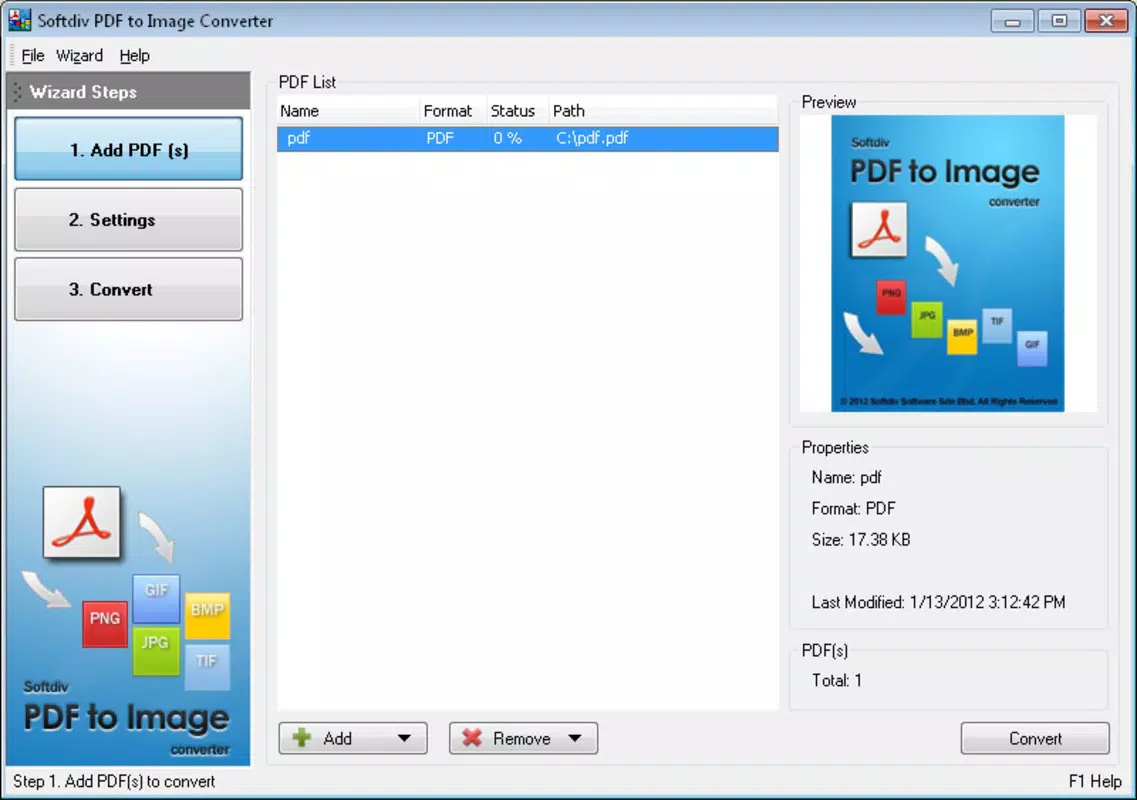
- Intuitive User Interface: Designed with usability in mind, the interface features a clean layout with clearly labeled buttons and straightforward workflows. Users can load PDFs, choose output settings, and initiate conversion with minimal steps, reducing the time required to complete tasks.
- Fast Conversion Speed: The application processes documents quickly, with conversion times measured in seconds or minutes depending on the file size and number of pages. This efficiency is beneficial for users managing multiple files or working under time constraints.
- Adjustable Image Quality Settings: Users can customize image quality from 1 to 100, allowing for a balance between file size and visual clarity. Higher values preserve detail but increase file size, while lower values reduce storage needs at the cost of some resolution.
- Large File Support: The tool is capable of handling large PDF files, ensuring that complex documents with high-resolution images or multiple pages are processed without failure or performance degradation.
For example, a graphic designer might use the app to convert a multi-page PDF brochure into individual PNG files for use in a website mockup. A teacher could extract key diagrams from a PDF textbook and save them as JPGs for classroom slides. Similarly, a researcher may convert a scanned journal article into a series of high-quality TIFF images for inclusion in a digital portfolio. These real-world applications highlight the tool’s practical value in both personal and professional environments.
Interface, UX & Performance
Softdiv PDF to Image Converter presents a minimalist interface that emphasizes functionality over visual flair. The layout is organized into logical sections: file input, output format selection, quality adjustment, and conversion controls. Navigation is linear and predictable, with minimal on-screen clutter. This design supports a smooth user experience, especially for those unfamiliar with file conversion tools.
Although the developer did not list formal performance metrics, the app demonstrates consistent responsiveness during file processing. Users can expect stable operation across different device categories, including older or lower-end systems, due to its small file size of 5.4 MB. The application does not exhibit lag or crashes during typical use, suggesting solid stability under standard conditions.
Performance is further enhanced by the app’s lightweight nature, which ensures quick startup times and low memory consumption. The conversion process remains smooth even with multi-page documents, and the interface remains accessible throughout. While no specific details were provided about touch support or adaptive layouts, the app’s desktop-oriented design implies it is optimized for traditional mouse and keyboard input. Overall, the UX is efficient and task-focused, aligning with the expectations of users seeking a no-nonsense conversion tool.
Platform Compatibility & Technical Requirements
Softdiv PDF to Image Converter is designed for the Windows platform. The current version is 1.0, and the application file size is 5.4 MB. The developer did not specify minimum OS requirements or compatibility details for different Windows versions. As such, it is unclear whether the app supports Windows 10, Windows 11, or earlier versions like Windows 7 or 8.1.
Given its small size and the absence of complex dependencies, the app is likely compatible with most modern Windows systems. However, users should exercise caution when installing on older or less common configurations. The developer did not list specific hardware or processor requirements, nor did they mention support for 32-bit or 64-bit systems. Compatibility information was not fully disclosed, so users are advised to test the application in their environment before relying on it for critical tasks.
Pros and Cons
Pros
- Free to download and use, making it accessible to all users.
- Supports multiple image formats including PNG, JPG, BMP, GIF, TGA, and TIFF.
- Lightweight with a small file size of 5.4 MB.
- Fast conversion speed suitable for both small and large files.
- Adjustable image quality settings for optimized output.
- User-friendly interface ideal for beginners and non-technical users.
Cons
- Platform limited to Windows; no support for macOS, Linux, Android, or iOS.
- Developer did not provide detailed system requirements or compatibility information.
- No built-in batch processing or automation features were mentioned.
- Interface lacks advanced customization options for power users.
- Version 1.0 suggests minimal updates or ongoing development.
FAQ
Is Softdiv PDF to Image Converter safe to download?
The app is free and available from the developer’s official source. However, users should always verify the download link and scan the file with antivirus software before installation to ensure security.
Can I convert multiple PDFs at once?
While the application supports large files, specific details about batch processing were not provided. It may require individual file uploads for conversion.
Does the app work on Windows 11?
The developer did not specify compatibility with Windows 11. However, due to its lightweight nature, it may run on newer Windows systems, though this is not guaranteed.
Is there a mobile version of this app?
Currently, Softdiv PDF to Image Converter is only available for Windows. There is no mobile version for Android or iOS devices.
How do I adjust image quality during conversion?
Users can set image quality from 1 to 100 in the app’s settings. Higher values result in better visual clarity but larger file sizes.
Final Thoughts
Softdiv PDF to Image Converter delivers a straightforward, efficient solution for transforming PDF documents into high-quality image files. Its support for multiple formats, adjustable quality settings, and fast processing make it a reliable choice for users who need quick and accurate conversions. While it lacks advanced features like batch processing and mobile support, its simplicity and free access make it a compelling option for Windows users.
Individuals in education, design, research, and office environments will benefit most from this tool, especially those who frequently extract visual content from PDFs. The app’s minimal footprint and stable performance further enhance its value as a no-frills utility.
For anyone seeking a secure, lightweight, and effective PDF-to-image converter on Windows, this tool offers a solid foundation. Download Softdiv PDF to Image Converter now.


